

How to stop haemorrhaging data on Facebook
- Written by: Belinda Barnet, Senior Lecturer in Media and Communications, Swinburne University of Technology
If you are one of 2.2 billion Facebook users worldwide, you have probably been alarmed by the recent coverage of the Cambridge Analytica scandal, a story that began when The Guardian revealed 50 million (now thought to be 87 million) user profiles had been retrieved and shared without the consent of users.
Though the #deletefacebook campaign has gained momentum on Twitter, it is simply not practical for most of us to delete our accounts. It is technically difficult to do, and given that one quarter of the human population is on the platform, there is an undeniable social cost for being absent.
Read more: Why we should all cut the Facebook cord. Or should we?
It is also not possible to use or even to have a Facebook profile without giving up at least some data: every time you open the app, click a link, like a post, hover over an ad, or connect to someone, you are generating data. This particular type of data is not something you can control, because Facebook considers such data its property.
Every service has a price, and the price for being on Facebook is your data.
However, you can remain on Facebook (and other social media platforms like it) without haemorrhaging data. If you want stay in touch with those old school friends – despite the fact you will probably never see them again – here’s what you can do, step by step. The following instructions are tailored to Facebook settings on mobile.
Your location
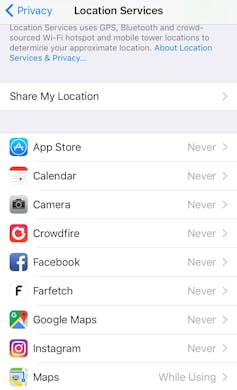 The first place to start is with the device you are holding in your hand.
Facebook requests access to your GPS location by default, and unless you were reading the fine print when you installed the application (if you are that one person please tell me where you find the time), it will currently have access.
This means that whenever you open the app it knows where you are, and unless you have changed your location sharing setting from “Always” to “Never” or “Only while using”, it can track your location when you’re not using the app as well.
To keep your daily movements to yourself, go into Settings on Apple iPhone or Android, go to Location Services, and turn off or select “Never” for Facebook.
While you’re there, check for other social media apps with location access (like Twitter and Instagram) and consider changing them to “Never”.
Remember that pictures from your phone are GPS tagged too, so if you intend to share them on Facebook, revoke access to GPS for your camera as well.
Your content
The first place to start is with the device you are holding in your hand.
Facebook requests access to your GPS location by default, and unless you were reading the fine print when you installed the application (if you are that one person please tell me where you find the time), it will currently have access.
This means that whenever you open the app it knows where you are, and unless you have changed your location sharing setting from “Always” to “Never” or “Only while using”, it can track your location when you’re not using the app as well.
To keep your daily movements to yourself, go into Settings on Apple iPhone or Android, go to Location Services, and turn off or select “Never” for Facebook.
While you’re there, check for other social media apps with location access (like Twitter and Instagram) and consider changing them to “Never”.
Remember that pictures from your phone are GPS tagged too, so if you intend to share them on Facebook, revoke access to GPS for your camera as well.
Your content
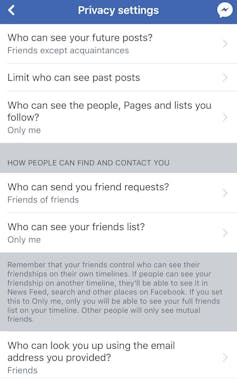 The next thing to do is to control who can see what you post, who can see private information like your email address and phone number, and then apply these settings in retrospect to everything you’ve already posted.
Facebook has a “Privacy Shortcuts” tab under Settings, but we are going to start in Account Settings > Privacy.
You control who sees what you post, and who sees the people and pages you follow, by limiting the audience here.
Change “Who can see your future posts” and “Who can see the people and pages you follow” to “Only Friends”.
In the same menu, if you scroll down, you will see a setting called “Do you want search engines outside of Facebook to link to your profile?” Select No.
After you have made these changes, scroll down and limit the audience for past posts. Apply the new setting to all past posts, even though Facebook will try to alarm you. “The only way to undo this is to change the audience of each post one at a time! Oh my Goodness! You’ll need to change 1,700 posts over ten years.” Ignore your fears and click Limit.
Read more:
It's time for third-party data brokers to emerge from the shadows
Next go in to Privacy Shortcuts – this is on the navigation bar below Settings. Then select Privacy Checkup. Limit who can see your personal information (date of birth, email address, phone number, place of birth if you provided it) to “Only Me”.
Third party apps
The next thing to do is to control who can see what you post, who can see private information like your email address and phone number, and then apply these settings in retrospect to everything you’ve already posted.
Facebook has a “Privacy Shortcuts” tab under Settings, but we are going to start in Account Settings > Privacy.
You control who sees what you post, and who sees the people and pages you follow, by limiting the audience here.
Change “Who can see your future posts” and “Who can see the people and pages you follow” to “Only Friends”.
In the same menu, if you scroll down, you will see a setting called “Do you want search engines outside of Facebook to link to your profile?” Select No.
After you have made these changes, scroll down and limit the audience for past posts. Apply the new setting to all past posts, even though Facebook will try to alarm you. “The only way to undo this is to change the audience of each post one at a time! Oh my Goodness! You’ll need to change 1,700 posts over ten years.” Ignore your fears and click Limit.
Read more:
It's time for third-party data brokers to emerge from the shadows
Next go in to Privacy Shortcuts – this is on the navigation bar below Settings. Then select Privacy Checkup. Limit who can see your personal information (date of birth, email address, phone number, place of birth if you provided it) to “Only Me”.
Third party apps
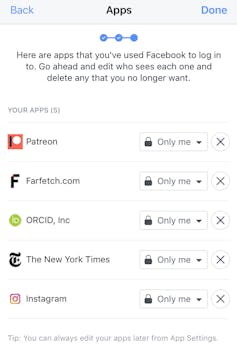 Every time you use Facebook to “login” to a service or application you are granting both Facebook and the third-party service access to your data.
Facebook has pledged to investigate and change this recently as a result of the Cambridge Analytica scandal, but in the meantime, it is best not to use Facebook to login to third party services. That includes Bingo Bash unfortunately.
The third screen of Privacy Checkup shows you which apps have access to your data at present. Delete any that you don’t recognise or that are unnecessary.
In the final step we will be turning off “Facebook integration” altogether. This is optional. If you choose to do this, it will revoke permission for all previous apps, plugins, and websites that have access to your data. It will also prevent your friends from harvesting your data for their apps.
In this case you don’t need to delete individual apps as they will all disappear.
Turning off Facebook integration
Every time you use Facebook to “login” to a service or application you are granting both Facebook and the third-party service access to your data.
Facebook has pledged to investigate and change this recently as a result of the Cambridge Analytica scandal, but in the meantime, it is best not to use Facebook to login to third party services. That includes Bingo Bash unfortunately.
The third screen of Privacy Checkup shows you which apps have access to your data at present. Delete any that you don’t recognise or that are unnecessary.
In the final step we will be turning off “Facebook integration” altogether. This is optional. If you choose to do this, it will revoke permission for all previous apps, plugins, and websites that have access to your data. It will also prevent your friends from harvesting your data for their apps.
In this case you don’t need to delete individual apps as they will all disappear.
Turning off Facebook integration
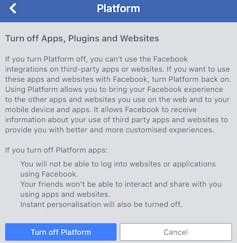 If you want to be as secure as it is possible to be on Facebook, you can revoke third-party access to your content completely. This means turning off all apps, plugins and websites.
If you take this step Facebook won’t be able to receive information about your use of apps outside of Facebook and apps won’t be able to receive your Facebook data.
If you’re a business this is not a good idea as you will need it to advertise and to test apps. This is for personal pages.
It may make life a little more difficult for you in that your next purchase from Farfetch will require you to set up your own account rather than just harvest your profile. Your Klout score may drop because it can’t see Facebook and that might feel terrible.
Remember this setting only applies to the data you post and provide yourself. The signals you generate using Facebook (what you like, click on, read) will still belong to Facebook and will be used to tailor advertising.
To turn off Facebook integration, go into Settings, then Apps. Select Apps, websites and games.
Read more:
We need to talk about the data we give freely of ourselves online and why it's useful
Facebook will warn you about all the Farmville updates you will miss and how you will have a hard time logging in to The Guardian without Facebook. Ignore this and select “Turn off”.
Well done. Your data is now as secure as it is possible to be on Facebook. Remember, though, that everything you do on the platform still generates data.
If you want to be as secure as it is possible to be on Facebook, you can revoke third-party access to your content completely. This means turning off all apps, plugins and websites.
If you take this step Facebook won’t be able to receive information about your use of apps outside of Facebook and apps won’t be able to receive your Facebook data.
If you’re a business this is not a good idea as you will need it to advertise and to test apps. This is for personal pages.
It may make life a little more difficult for you in that your next purchase from Farfetch will require you to set up your own account rather than just harvest your profile. Your Klout score may drop because it can’t see Facebook and that might feel terrible.
Remember this setting only applies to the data you post and provide yourself. The signals you generate using Facebook (what you like, click on, read) will still belong to Facebook and will be used to tailor advertising.
To turn off Facebook integration, go into Settings, then Apps. Select Apps, websites and games.
Read more:
We need to talk about the data we give freely of ourselves online and why it's useful
Facebook will warn you about all the Farmville updates you will miss and how you will have a hard time logging in to The Guardian without Facebook. Ignore this and select “Turn off”.
Well done. Your data is now as secure as it is possible to be on Facebook. Remember, though, that everything you do on the platform still generates data.
Authors: Belinda Barnet, Senior Lecturer in Media and Communications, Swinburne University of Technology
Read more http://theconversation.com/how-to-stop-haemorrhaging-data-on-facebook-94511


 Daily Bulletin


